- Python 99%
- Jupyter Notebook 0.6%
- Shell 0.4%
| Filename | Latest commit message | Latest commit date |
|---|---|---|
|
|
||
| .github | ||
| Data | ||
| doc | ||
| script | ||
| synrxn | ||
| Test | ||
| .gitignore | ||
| .readthedocs.yml | ||
| baseline.py | ||
| build_doc.sh | ||
| CITATION.cff | ||
| example.ipynb | ||
| LICENSE | ||
| lint.sh | ||
| manifest.json | ||
| pyproject.toml | ||
| pytest.sh | ||
| README.md | ||
| requirements.txt | ||

SynRXN





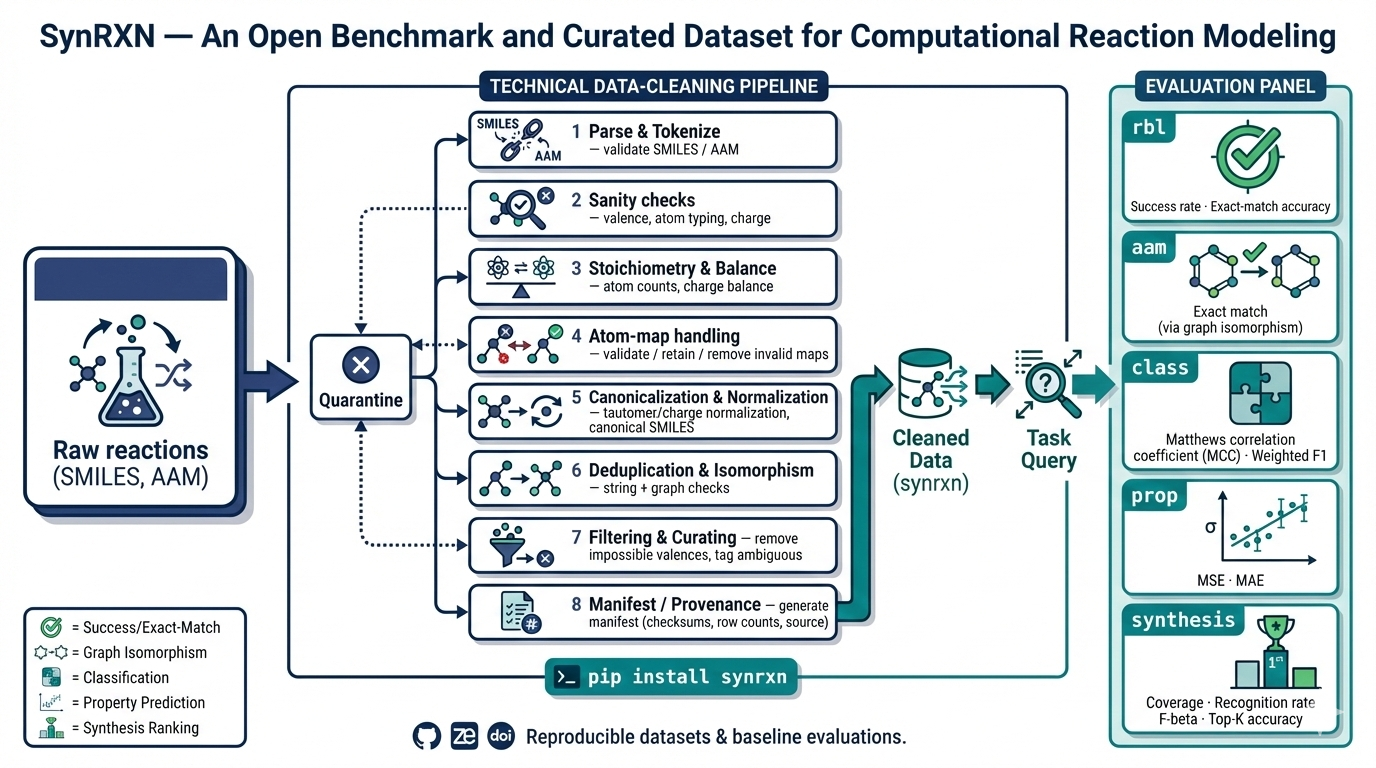
Reaction Database for Benchmarking SynRXN is a curated, provenance-tracked collection of reaction datasets and evaluation manifests designed for reproducible benchmarking of reaction-informatics tasks (rebalancing, atom-atom mapping, reaction classification, property prediction, and synthesis/retrosynthesis). It provides standardized splits, manifest files (RNG seeds & split indices), and lightweight utilities to load and inspect datasets for fair, reproducible model comparison.
Installation
-
Python Installation: Ensure that Python 3.11 or later is installed on your system. You can download it from python.org.
-
Creating a Virtual Environment (Optional but Recommended): It's recommended to use a virtual environment to avoid conflicts with other projects or system-wide packages. Use the following commands to create and activate a virtual environment:
python -m venv synrxn-env
source synrxn-env/bin/activate
Or Conda
conda create --name synrxn-env python=3.11
conda activate synrxn-env
- Install from PyPi: The easiest way to use SynTemp is by installing the PyPI package synrxn.
pip install synrxn
Optional if you want to install full version
pip install synrxn[all]
Example
from synrxn.data import DataLoader
from synrxn.split.repeated_kfold import RepeatedKFoldsSplitter

# 1) Zenodo (stable release)
from pathlib import Path
from synrxn import DataLoader

dl = DataLoader(
    task="classification",
    source="zenodo",
    version="0.0.6",
    cache_dir=Path("~/.cache/synrxn").expanduser(),
)
print(dl.available_names())   # list available datasets
df = dl.load("schneider_b")
print(len(df), df.columns.tolist())

# 2) GitHub release tag
from pathlib import Path
from synrxn.data import DataLoader

dl = DataLoader(
    task="classification",
    source="github",
    version="v0.0.6",
    cache_dir=Path("~/.cache/synrxn").expanduser(),
    gh_enable=True,
)
print(dl.available_names())
df = dl.load("schneider_b")
print(len(df))

# 3) GitHub commit (pin to SHA)
from pathlib import Path
from synrxn.data import DataLoader

dl = DataLoader(
    task="classification",
    source="commit",
    version="3e1612e2199e8b0e369fce3ed9aff3dda68e4c32",
    cache_dir=Path("~/.cache/synrxn").expanduser(),
    gh_enable=True,
)
print(dl.available_names())
df = dl.load("schneider_b")
print(df.head(2))

# 4) GitHub latest
from pathlib import Path
from synrxn.data import DataLoader

dl = DataLoader(
    task="classification",
    source="github",
    version="latest",
    cache_dir=Path("~/.cache/synrxn").expanduser(),
    gh_enable=True,
)
print(dl.available_names())
df = dl.load("schneider_b")
print(df.shape)

# Simple splitting example (property dataset)
from synrxn.data import DataLoader
from synrxn.split.repeated_kfold import RepeatedKFoldsSplitter
from pathlib import Path

dl = DataLoader(
    task="property",
    source="commit",
    version="latest",
    cache_dir=Path("~/.cache/synrxn").expanduser(),
    gh_enable=True,
)
df = dl.load("b97xd3")

splitter = RepeatedKFoldsSplitter(
    n_splits=5, n_repeats=2, ratio=(8,1,1), shuffle=True, random_state=1
)

splitter.prepare_splits(df, stratify=None)
train_df, val_df, test_df = splitter.get_split(0, 0, as_frame=True)
print(len(train_df), len(val_df), len(test_df))
Contributing
Publication
SynRXN: A Benchmarking Framework and Open Data Repository for Computer-Aided Synthesis Planning
License
This project is licensed under MIT License - see the License file for details.
Acknowledgments
This project has received funding from the European Unions Horizon Europe Doctoral Network programme under the Marie-Skłodowska-Curie grant agreement No 101072930 (TACsy -- Training Alliance for Computational)